KAKINIWAWrite a story with many characters, all in one place.
Character settings in a notepad, the relationship map in another tool, foreshadowing on sticky notes. This free app gathers your manuscript, character settings, relationship maps, terms and foreshadowing into a single project.
It also catches the inconsistencies that creep in as you write: a character's speech style (sentence endings) drifting, names that don't match the "form of address" on the relationship map, inconsistent spellings, unresolved foreshadowing and typos. For chaban and Yukkuri video scripts, you can also hand off to YMM4. With the dedicated plugin (beta), you can lay your script out directly on the YMM4 timeline.
The materials for your work end up scattered everywhere.
Show your character and world notes right beside the writing screen. Write while you look at them, without going to find them.
Gather, catch, trace, hand off.
We grouped the features for keeping a story with many characters going into four. Each one is described in detail on the features page.
Gather
Your manuscript, character settings, relationship maps with points in time, terms, foreshadowing and plot, all in one project. Show your notes next to the writing screen and write while you look at them. You can also build a character table and an IME dictionary for a constructed language.
Catch
Proofreading tells you about the inconsistencies that creep in as you write: a character's speech style (sentence endings) drifting, names that don't match the "form of address" on the relationship map, inconsistent spellings and typos. Unresolved foreshadowing is listed on the Dashboard.
Trace
Lines up the in-story timeline in episode order and shows each character's age in each episode. Characters who haven't appeared for a while are listed too, longest absence first.
Hand off
E-books (EPUB, vertical text, with ruby), HTML for reading, screenplay format, and print or PDF. For chaban and Yukkuri videos, also a YMM4 script and direction sheet, and bulk placement on the timeline with the dedicated plugin (beta).
See all features → There is also a manual for AI that summarizes the script notation (Write scripts with AI).
All of it, inside this one app.
Everything below is a real screen. If you choose "Learn with a sample" on first launch, a sample project is added so you can start trying things out right away.


How it works for chaban and Yukkuri videos, in 4 minutes.
On real screens, you can follow the whole process from writing a script to seeing it laid out in YMM4. We also announce updates in videos (YouTube channel →).
Set it up, write it, send it to YMM4.
Video scripts live in the same project too. Lines are exported as a script for YMM4, and expressions, SFX, backgrounds and durations go into a direction sheet. Work that used to be scattered becomes one continuous flow.

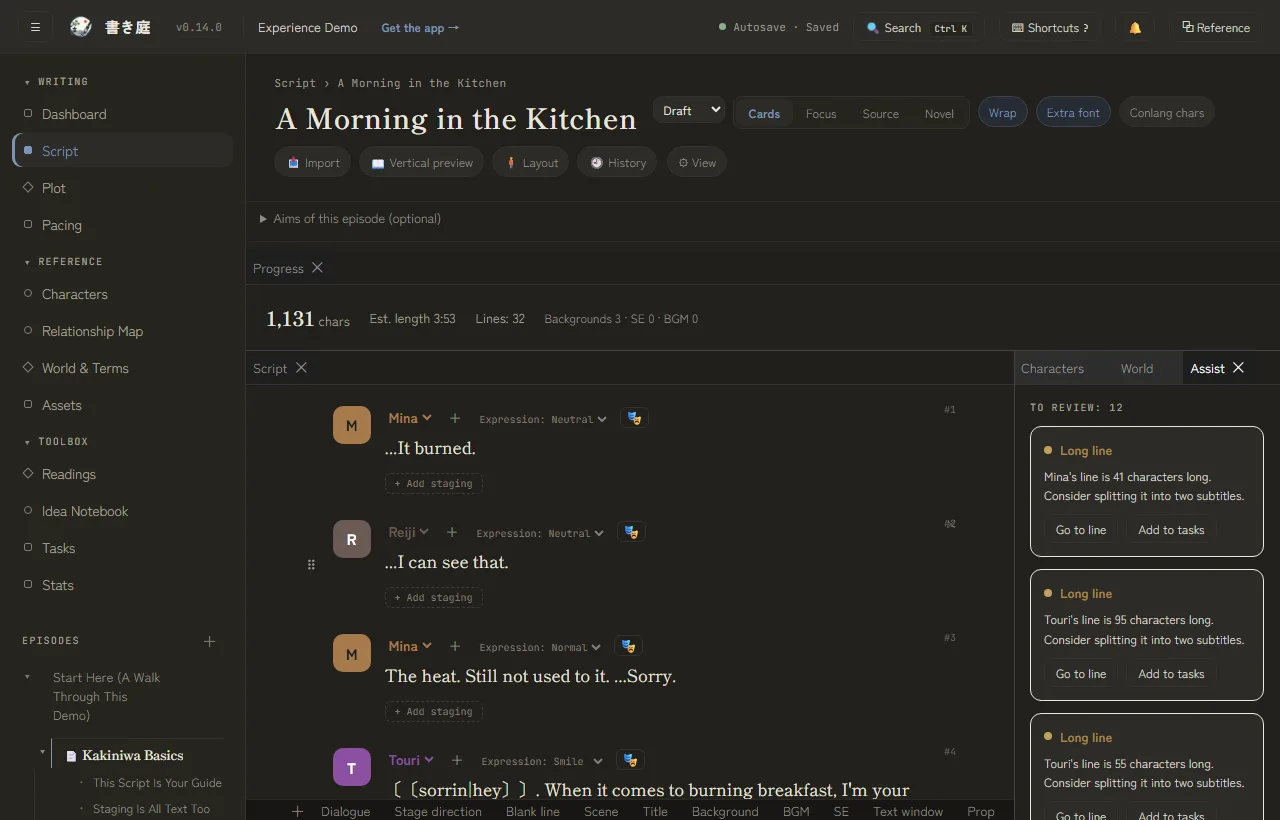
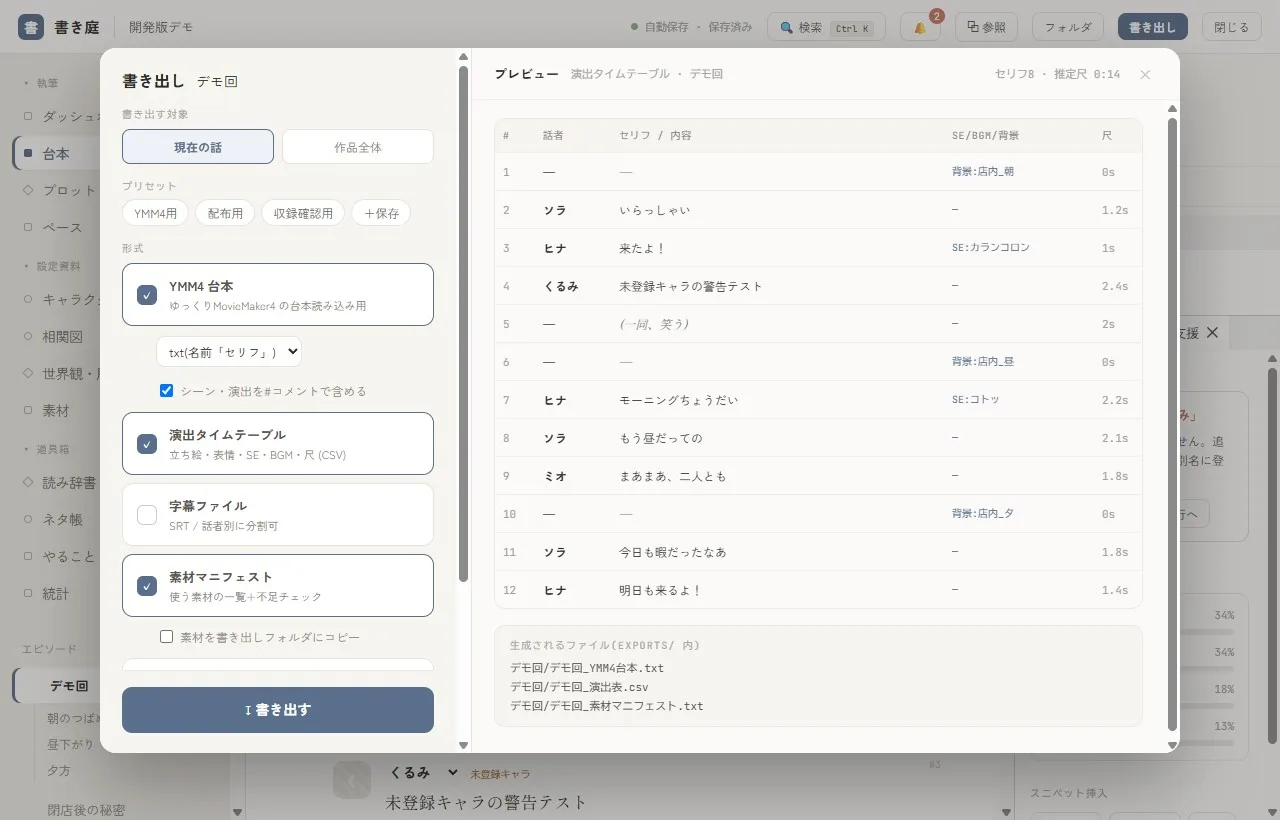
Lines are loaded into YMM4, and expressions, SFX, backgrounds and durations are exported as a direction sheet. All your production prep gets done in one go.
Note: We are also developing a dedicated plugin that places your script on the timeline automatically (beta). How it works and how to use it →
Human-readable Markdown + YAML.
So nothing disappears.
Opens in Notepad or Obsidian
Your work isn't locked inside a special binary format. You can read the contents as they are, and you can track changes with Git.
Three safeguards
Version history that keeps versions automatically (including character and world settings), a trash bin that holds deleted items, and backups that restore a whole project. Kakiniwa also saves automatically before any restore.
Works offline, no lock-in
Every feature works without an internet connection. Even if you stop using the app, your projects stays with you as plain text.
# Character settings (frontmatter)
name: Touri
reading: Touri
aliases: []
color: "#8a4fa0"
profile:
  - label: First person / Second person
    value: I / you
timeline:
  - point: Episode 1
    body: The three of them eat the breakfast she burned.
---
To the townsfolk, she's “the odd one who makes ointments.” Once she says “just for a bit” and heads into her workshop, she doesn't come out until morning.
Only features that use servers are paid.
Kakiniwa itself is free. Only sharing and cloud features that use servers are paid, and the fees go toward running the service and keeping development going.
The desktop edition is free (all features, no ads). The official Remote, which lets you write from anywhere, is free to use right now. The Cloud edition, which keeps your projects on a server, is in preparation.
Looking for people to help it grow.
Feedback, requests and bug reports are all welcome. If you're stuck, feel free to ask.
Just keep making your work as usual and send us what's frustrating or what you'd like to see. Beta participants are planned to receive perks in the full release. You can send it through Discord, chat or the form.
Support and contact → Community (Discord) → FAQ → For bugs, you can also send a diagnostic report (with an error code) from inside the app.
Free to use.
Create one new character. Try bringing over the first episode you're writing right now. Start there.